Last week I said that any good project starts with a plan. Then, I created a general outline, a proposal, for my plan to create an animated infographic talking about women’s reproductive rights. Now, it’s time to get into the nitty-gritty and plan out the remainder of my time working on this project.
To help me break down my project, I am using a project management system. Some well-known software is Trello, Asana, ClickUp, and many, many more. You’ll typically see these being used for teams, but if you are the whole team, it can still be used for individuals.
When selecting my software, I was mainly choosing between Trello and Asana. I’m already quite familiar with Trello as I use it in my job. It’s a Kanban-style system with multiple boards and is easy to read and understand at a glance. Asana, I have less experience using. It has multiple project views, including Kanban-style boards and waterfall-style lists.
In the end, I chose to go with Asana.
Why I Chose Asana
I chose Asana as my project management system because I prefer their multiple format options. When I need to glance at my week, the list view works best for me, but when honing in on a specific task, I find the board view is a better fit.
I also prefer the way subtasks are laid out in Asana over Trello. You can easily click a dropdown arrow (in both views) to view and check off subtasks. To me, Asana feels like a smoother application that fits multiple scenarios and is easy to understand at a glance.
A bonus? Since I’m not super familiar with Asana, using it to plan my project gives me the opportunity to learn and be proficient in multiple project management systems.
Phases of Work
When setting up my project in Asana, I broke my work down by week and what I wanted to get accomplished each of those weeks.
- Week 3: Data collection + Scripting
- Week 4: Storyboarding + Animation Prep
- Week 5: Creation
- Week 6: Revisions
- Week 7: Delivery
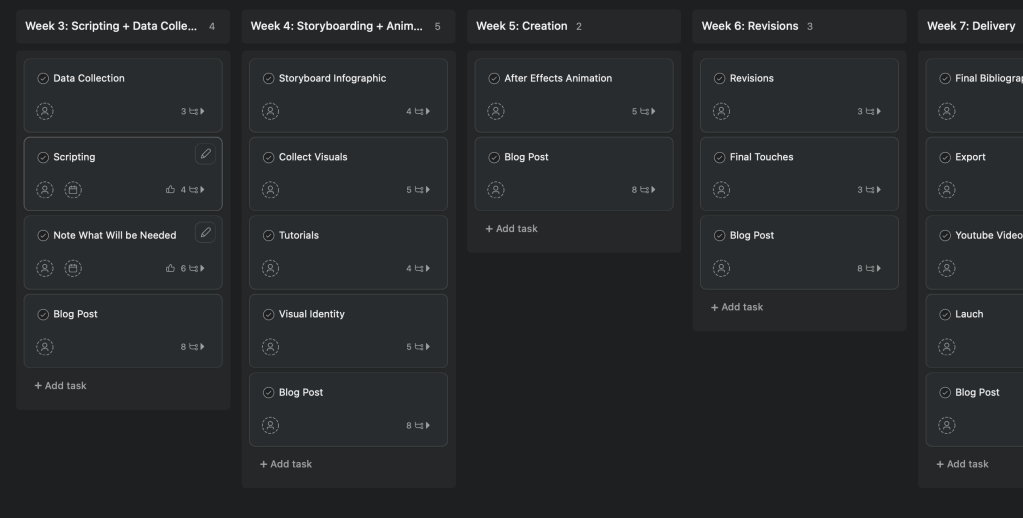
Note: The Asana plan begins Week 3 since the first week has already passed, and Week 2 includes creating the project plan (what you’re reading now!). The remaining 5 weeks get into the bulk of the creation of the actual video.
Each week has a few major tasks outlining the artifacts that need to be completed for that week. Each of these tasks has subtasks underneath, getting specific about what needs to be completed for each artifact.
Tasks will differ from week to week. Weeks 3 and 4, for example, have more major tasks since it’s primarily prep work. Weeks 5 and 6 look a little lighter since I will be focused on the actual animation. Although it doesn’t look like much, the work during the two weeks will be very time-consuming.
A blog post (like the one you’re reading now!) will be created and posted each week to catalog my progress in each of the phases. This will be the only repeat task for each week.
The Importance of Project Management
Working in a project management system, even when you’re just working on your own, helps to get your project started on the right foot. If you ever get that paralyzed feeling at the beginning of a project and don’t know where to start, this method is worth a look.
Project management systems help improve planning and scheduling. It helps to “reduce confusion and overlapping work while having a good idea of what’s coming down the line,” explains Slack. It helps you stay on track and not miss anything that could delay your project.
When working on a large project where every moment counts, it’s best to take some time at the beginning to develop your plan. Take the time to understand the scope of your project, how much time and effort it will take, and everything you’ll need to accomplish your goals. After all, every project needs a strong foundation.
For a more in-depth look, read my full project plan below:


Leave a Reply